The AeroTexas FuelJabber, our unique flight simulation online fuel planner now includes a weight analysis so you can verify that the fuel requirements do not exceed maximum fuel weight. FuelJabber also adds a payload estimate based on actual load factors, so you can plan weight and balance more realistically, and actually have a reason to kick off passengers if the the weight exceed maximums.
Click here to go to the FuelJabber
Showing posts with label fueljabber. Show all posts
Showing posts with label fueljabber. Show all posts
Tuesday, October 20, 2009

Wednesday, August 26, 2009
FuelJabber Updated
Our fuel planning solution has been updated to support the Fokker 70 regional jet as designed by Project FOKKER Jetline.
Friday, May 15, 2009
FuelJabber Updated
FuelJabber is AeroTexas' own fuel planner that estimates fuel usage and requirements based on enroute times and fuelage values for selected flight simulator aircraft. Recently updated, FuelJabber uses the latest fuelage statistics to estimate fuel, and has been expanded to allow for time-based as well as distance-based fuel planning.
Check it out here.
Check it out here.
Friday, November 7, 2008
FlightAware's Flight Planner - First Impressions
A few weeks ago I received an e-mail from Daniel Baker, the CEO of FlightAware. FlightAware is a website that offers free flight tracking service for US air traffic. One feature that I use quite a bit is the IFR Route Analyzer, which allows me to see all the flights and associated flight plans for a given origin/destination pair. Building on this, FlightAware is attempting to be the industry leader in flight planning by bringing powerful features and convenience with an online flight planning application that automatically calculates the optimal altitude and route, and displays time enroute and estimated fuel usage.
I gave the new flight planner a run through its paces and can verify that they make things pretty easy. Along with a flight plan, you also get a navigation log, and links to bundled approach plates, airport diagrams, weather, etc. I was particularly interested in the fuel usage estimations. They give you a default list of mostly general aviation aircraft from which to choose, but don't expect to see any big iron listed. However, you can enter your own aircraft information if you know the performance data for climb, cruise and descent - it saves this data for you so next time you just select your aircraft and off you go.
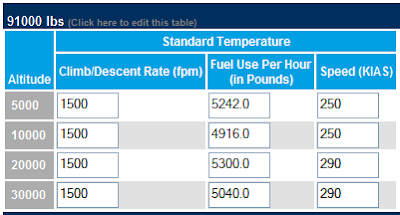
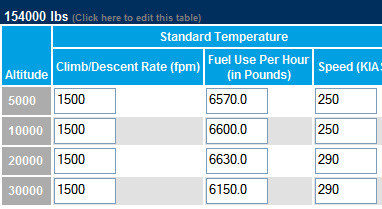
Performance data is set up as either (a) Time, Fuel, and Distance; or (b) Climb/Descent Rate and Fuel Consumption per Hour. Lately I've logged a few hours in the Boeing 737-700, and decided to collect data for Climb/Descent Rate and Fuel Consumption. This is what the collected data looks like in FlightAware's performance table for Fuel Consumed Over Time to Climb - note that I've used two different gross weight configurations (91000 lbs and 154000 lbs, which pretty much covers the range of acceptable weights for this aircraft - eg., 154500 lbs is MTOW).
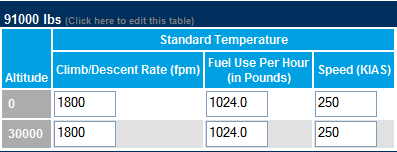
I used the same performance data for both weight classes in the Fuel Consumed Over Time to Descend. I realize this is somewhat simplistic, but the sim rarely moved the autothrottles off the IDLE detent during my descents.
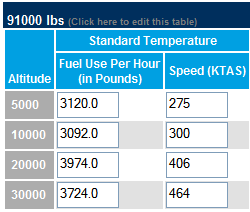
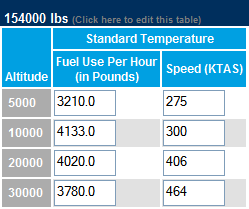
Cruise data is presented below. Note that FlightAware expects speeds to be in KIAS for climb and descents, but KTAS for cruise. This is important, because if you enter KTAS for climbs and descents you'll likely get estimates of arrival time that would suggest you were flying super sonic! Here I've simply calculated KTAS for KIAS at given altitude and at standard temperature.
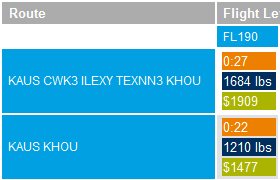
After setting up the performance profile, I planned a flight from Austin (KAUS) to Houston Hobby (KHOU) - one of our signature flights. I set the altitude range from FL180 to FL410, used 145000 lbs gross weight, and $4/gallon of fuel. After putting me in a holding pattern, FA gave me two choices, listed in order of recencly flown by other aircraft:
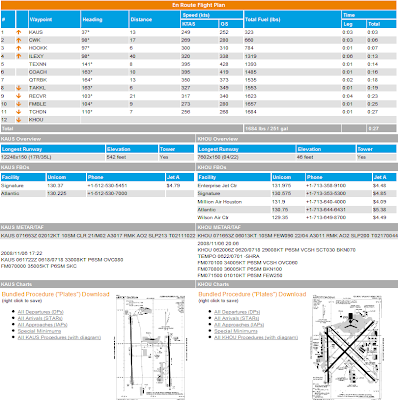
I selected the first one then pressed the Plan Flight button, which displayed a flight summary, enroute flight plan, overview of both airports, including runway lengths, FBOs (not needed in the sim world, but there it is anyway), METARS and TAFS, and links to bundlded procedure plates, including all departures, arrivals, approaches, and special minimums. The airport facility chart is displayed as well.
Next, I created flight plans for two of our national routes: Austin to Phoenix (KPHX), and Austin to Miami (KMIA). The flight planner worked really well and each time presented me with a matrix of flight plans (by row) and flight levels (by column) along with time enroute, fuel usage, and cost.
The flight plans that came to the top were based on recent aircraft, and were the actual routes as flown in the real world:
Austin to Phoenix: KAUS AUS2 JCT J86 ELP J50 SSO KOOLY1 KPHX
Austin to Miami: KAUS CWK3 TNV IAH J86 LEV Q102 BAGGS SSCOT1 KMIA
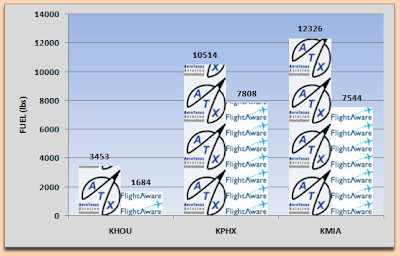
I was interested to see how well the estimated fuel usage compares to actual usage in the sim, and I would suspect it would be pretty close considering the performance data is based on the sim's performance. I'll have to save those results for another day, but I did compare the fuel usage estimates from the fuel planner we use at AeroTexas and found that the FA numbers were consistently lower. There's a couple of reasons for this. One is that FA does not consider ground time, which is built-in to the fuel usage data at AeroTexas. Second, FA accounts for winds aloft, which explains why the flight planned to Miami was shorter than the flight to Phoenix for the plans I generated today.
Overall I like FlightAware's Flight Planner. It's a good resource for simulation pilots, though I'm not too keen on entering aircraft performance data for many multiple aircraft. I will continue to use AeroTexas' FuelJabber for most flight because it's much simpler, and because it estimates reserves as well as enroute fuel usage, and gives me total fuel times. I look forward to future refinements of FlightAware's planner.
I gave the new flight planner a run through its paces and can verify that they make things pretty easy. Along with a flight plan, you also get a navigation log, and links to bundled approach plates, airport diagrams, weather, etc. I was particularly interested in the fuel usage estimations. They give you a default list of mostly general aviation aircraft from which to choose, but don't expect to see any big iron listed. However, you can enter your own aircraft information if you know the performance data for climb, cruise and descent - it saves this data for you so next time you just select your aircraft and off you go.
Performance data is set up as either (a) Time, Fuel, and Distance; or (b) Climb/Descent Rate and Fuel Consumption per Hour. Lately I've logged a few hours in the Boeing 737-700, and decided to collect data for Climb/Descent Rate and Fuel Consumption. This is what the collected data looks like in FlightAware's performance table for Fuel Consumed Over Time to Climb - note that I've used two different gross weight configurations (91000 lbs and 154000 lbs, which pretty much covers the range of acceptable weights for this aircraft - eg., 154500 lbs is MTOW).


I used the same performance data for both weight classes in the Fuel Consumed Over Time to Descend. I realize this is somewhat simplistic, but the sim rarely moved the autothrottles off the IDLE detent during my descents.

Cruise data is presented below. Note that FlightAware expects speeds to be in KIAS for climb and descents, but KTAS for cruise. This is important, because if you enter KTAS for climbs and descents you'll likely get estimates of arrival time that would suggest you were flying super sonic! Here I've simply calculated KTAS for KIAS at given altitude and at standard temperature.


After setting up the performance profile, I planned a flight from Austin (KAUS) to Houston Hobby (KHOU) - one of our signature flights. I set the altitude range from FL180 to FL410, used 145000 lbs gross weight, and $4/gallon of fuel. After putting me in a holding pattern, FA gave me two choices, listed in order of recencly flown by other aircraft:

I selected the first one then pressed the Plan Flight button, which displayed a flight summary, enroute flight plan, overview of both airports, including runway lengths, FBOs (not needed in the sim world, but there it is anyway), METARS and TAFS, and links to bundlded procedure plates, including all departures, arrivals, approaches, and special minimums. The airport facility chart is displayed as well.

Next, I created flight plans for two of our national routes: Austin to Phoenix (KPHX), and Austin to Miami (KMIA). The flight planner worked really well and each time presented me with a matrix of flight plans (by row) and flight levels (by column) along with time enroute, fuel usage, and cost.
The flight plans that came to the top were based on recent aircraft, and were the actual routes as flown in the real world:
Austin to Phoenix: KAUS AUS2 JCT J86 ELP J50 SSO KOOLY1 KPHX
Austin to Miami: KAUS CWK3 TNV IAH J86 LEV Q102 BAGGS SSCOT1 KMIA
I was interested to see how well the estimated fuel usage compares to actual usage in the sim, and I would suspect it would be pretty close considering the performance data is based on the sim's performance. I'll have to save those results for another day, but I did compare the fuel usage estimates from the fuel planner we use at AeroTexas and found that the FA numbers were consistently lower. There's a couple of reasons for this. One is that FA does not consider ground time, which is built-in to the fuel usage data at AeroTexas. Second, FA accounts for winds aloft, which explains why the flight planned to Miami was shorter than the flight to Phoenix for the plans I generated today.

Overall I like FlightAware's Flight Planner. It's a good resource for simulation pilots, though I'm not too keen on entering aircraft performance data for many multiple aircraft. I will continue to use AeroTexas' FuelJabber for most flight because it's much simpler, and because it estimates reserves as well as enroute fuel usage, and gives me total fuel times. I look forward to future refinements of FlightAware's planner.
Wednesday, April 23, 2008
FuelJabber Updated
One of the most useful tools on the AeroTexas website is FuelJabber - the flight simulation fuel planner. It was designed specifically for aircraft supported at ATX, and estimates fuel use and reserves for flights between airports. FuelJabber now supports 24 different aircraft, and calculates diversion, holding and contingency fuel, estimated time enroute, and even reserve fuel time, and time-to-empty.
Wednesday, January 24, 2007
FuelJabber - the AeroTexas Fuel Planner
AeroTexas is proud to announce a new online flight planning tool: FuelJabber is a simple online form that will calculate on board fuel requirements, including alternate reserves, and extra fuel for anticipated holding, and other contingencies. Simply select your aircraft, origin, and destination, and FuelJabber will do the rest.
Subscribe to:
Posts (Atom)


 Posts
Posts

